
How to Get Your IEEPA Tariff Refund: The Definitive Step-by-Step CAPE Portal Filing Guide
Managing global corporate capital demands absolute precision when recovering systemic trade overpayments. Following landmark federal litigation that determined massive secondary customs assessments under the International Emergency Economic Powers Act were unlawfully enacted, U.S. Customs and Border Protection is actively executing a massive multi-billion-dollar reimbursement workflow. For small businesses and enterprise level importers alike, executing the technical IEEPA tariff refund process stands as a primary financial priority to restore frozen corporate margins.
To successfully execute this asset reclamation, corporate trade departments must move past broad supply chain strategies and work directly with specialized electronic entry systems. CBP built and deployed a customized web interface inside the Automated Commercial Environment to handle this process. Working with these structures requires strict attention to database rules, detailed document checks, and direct communication lines with your licensed filing agents.
Before launching a submission packet, compliance officers must review background parameters. If you need a comprehensive overview of how these secondary emergency penalties alter your compliance balance sheets, read our fundamental guide on what are IEEPA tariffs to map the baseline legal frameworks[cite: 1].
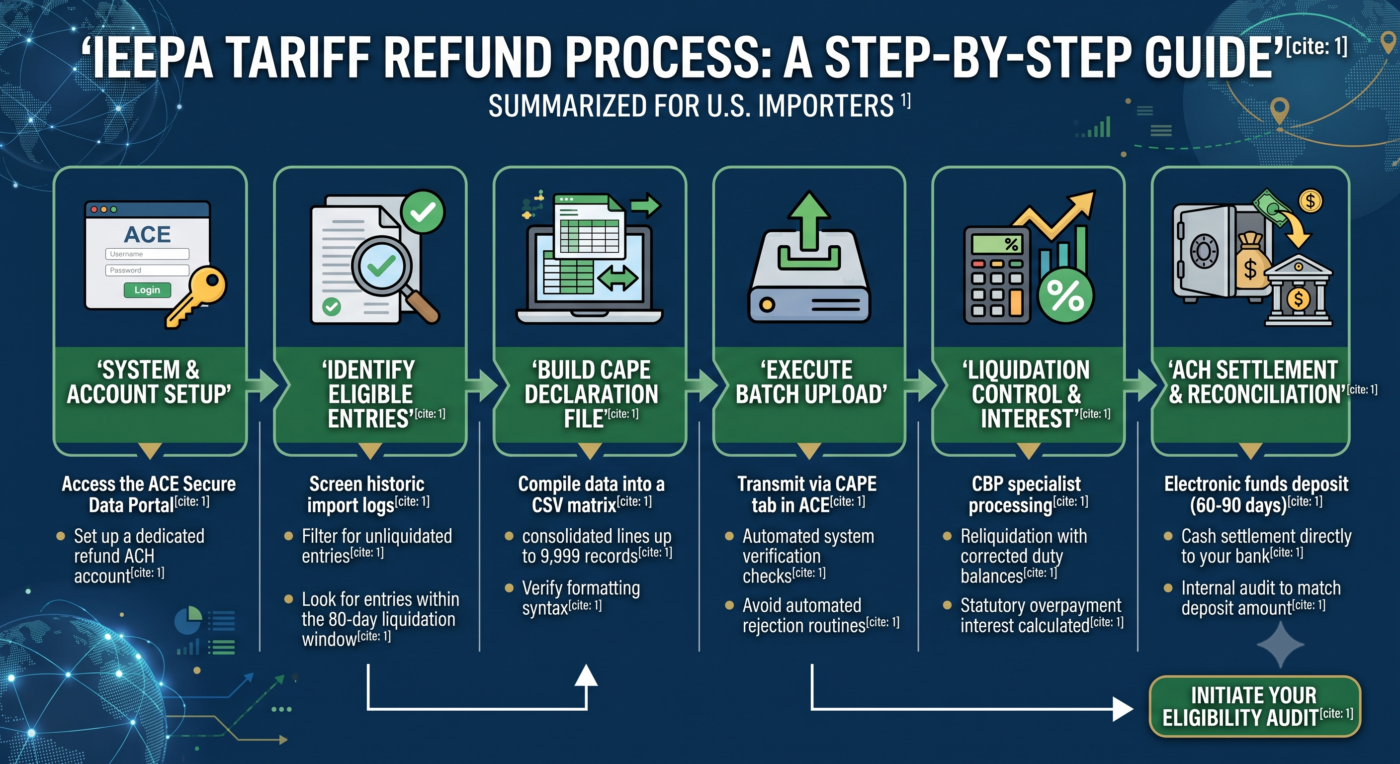
Step 1: System Integration and Account Validation
The initial phase of the recovery cycle focuses entirely on data infrastructure verification. Importers cannot utilize standard public forms or manual mail channels to file an **IEEPA refund** claim. All processing runs through the virtual tariff refund portal built directly into the ACE Secure Data Portal. Your internal compliance team or designated filing broker must ensure your accounts are completely integrated before trying to access the transmission systems.
Log into your enterprise level account and verify your Importer of Record configurations. Any mismatch between your historical import filing records and your current corporate entity sub-accounts will trigger systemic access restrictions. If your corporate infrastructure has undergone structural changes, corporate mergers, or name updates since paying the initial duties, these data conflicts must be resolved before proceeding.
Furthermore, this integration stage requires an explicit configuration step regarding financial logistics. The **tariff refund portal** does not pull account details automatically from your standard automated duty payment profiles. Importers must set up a standalone, refund-specific Automated Clearing House account within the ACE dashboard. CBP will systematically hold approved entries in a permanent billing freeze until your bank validation records match their database parameters.
Step 2: Database Extraction and Entry Screening
Once system parameters match, compliance teams must compile historical transaction records to isolate eligible entry profiles. This screening process requires deep database queries across all custom entry lines filed during the emergency tariff enforcement window. Your analysis must track explicit Harmonized Tariff Schedule Chapter 99 duty codes to separate regular statutory fees from target penalty sums.
This data extraction phase requires checking records against strict statutory limits. The newly launched automated CAPE tariff refund system processes data packages based on a tiered phase sequence[cite: 1]. To gain authorization for Phase 1 processing tracks, every entry summary must meet one of two rigid structural requirements:
- The entry summary must remain entirely unliquidated within the main custom tracking database[cite: 1].
- The entry must have been liquidated within the preceding 80 days, placing it within the voluntary reliquidation window under 19 U.S.C. § 1501[cite: 1].
Isolating these specific entry vectors ensures your file stays clean. If your data team packs excluded, complex, or older entries into the transmission file, the automated portal will reject the whole packet. For a transparent analysis of how geographic port corridors dictate these entry statuses across regional hubs, review our specialized Customs Brokerage Services Module to verify your location variables[cite: 1].
| Filing Class | Eligibility Windows | Administrative Status | System Track |
|---|---|---|---|
| Phase 1 Streamline | Unliquidated or < 80 Days since Liquidation | Fully Eligible | Automated CAPE Execution[cite: 1] |
| Administrative Phase 2 | > 80 Days since Liquidation | Deferred Review | Manual Processing Queues[cite: 1] |
| Exclusion Vectors | AD/CVD, Open Protests, Active Drawback Summary | System Block | Automated Rejection Routine[cite: 1] |
Step 3: Compilation of the CAPE Declaration
The core execution step centers on building the data upload file. To process millions of legacy transactions efficiently, CBP does not review individual paper invoices. Instead, the IEEPA tariff refund process requires the consolidation of multiple lines into a single electronic text matrix known as a CAPE Declaration. This database template uses a comma-separated values format to match your historical trade activity with CBP’s central database fields.
Your database specialist must input every eligible entry number into the file following strict alphanumeric syntax layouts. Each individual batch declaration can hold up to 9,999 unique entry rows, and corporations can submit multiple parallel declarations to cover their entire historical footprint. During compilation, ensure that formatting items like hyphens, space characters, and check digits exactly match the values originally logged on your CBP Form 7501 documents.
Any variance in the alphanumeric strings will stop processing immediately. Our brokerage teams specialize in running advanced pre-submission data checks to clean up validation errors before final data compilation. Importers can access our core terminal portal directly on the AIT Tahipo Homepage to deploy these defensive auditing modules[cite: 1].
Step 4: Transmitting Data Packs Through ACE
With the upload document cleaned and verified, the next phase is electronic transmission. Log into your dashboard interface and navigate directly to the newly launched CAPE tab within the trade remedies dashboard. This interface is the main IEEPA duty refunds website interface designed to process bulk emergency data uploads.
When you trigger the file upload, the automated system runs two distinct checks to verify data integrity:
- Structural File Check: The portal scans the text layout, column spacing, and overall size to confirm the document matches CBP’s master template layout.
- Line Item Check: The portal reads each entry line to verify that the corresponding duties were paid and that the records match an eligible Importer of Record account profile.
If the declaration passes both check stages, the system logs a formal acceptance receipt and changes the batch tracking status to “Accepted for Processing.” This action places your entries into the active reliquidation queue. If you want to review the full compliance workflows used during these electronic data transmissions, read our dedicated page regarding IEEPA Tariff Refund Filings[cite: 1].
System Alert: Avoid Automated Rejections
CBP trade messaging explicitly warns that if a declaration contains a single formatting error or an ineligible entry summary row, the portal will drop the entire file[cite: 1]. It will not process partial files. Importers will have to restart the submission queue from the beginning.
Step 5: Liquidation Controls and Interest Calculation
After your file is accepted, the processing moves to regional customs specialists for final statement updates. During this stage, federal reviewers systematically strip the contested Chapter 99 emergency tariff codes from your historical files and recalculate your duty obligations as if those emergency restrictions had never been applied.
For unliquidated entries, the system locks the new values into the ledger, allowing them to liquidate normally with the corrected duty balances roughly 45 days later. For entries that were already liquidated, the database triggers an immediate voluntary reliquidation cycle, which completes on the next business day.
Crucially, this financial recalculation includes the addition of statutory overpayment interest under 19 U.S.C. § 1505(c). Because importers are owed interest running from the exact date their original duties were deposited at the port of entry until the date of reliquidation, this interest line provides a major boost to your final capital recovery. The current rates are adjusted quarterly by the U.S. Treasury, sitting at 6% annually for corporate entities and 7% annually for noncorporate filers.
Step 6: ACH Settlement and Final Treasury Reconciliation
The final phase of the recovery track is the actual cash settlement. Once the entries clear liquidation or reliquidation status, the database groups the approved balances by your Importer of Record code and schedules an electronic payout. The U.S. Treasury processes these payments as a consolidated electronic deposit, rather than issuing a separate **tariff refund check** for each individual transaction row.
This cash settlement takes roughly 60 to 90 days from initial file acceptance to hit your bank account. When the electronic deposit lands, your accounting department must execute a final reconciliation. Pull your daily and weekly ACE account statements to cross-reference the deposit total with the approved values logged on your initial declarations.
This step ensures that all principal duty balances and statutory interest lines were calculated correctly by the government. If any data conflicts or underpayments are uncovered during reconciliation, your firm must log an official administrative inquiry before the close of the matching fiscal reporting period. To learn more about setting up these post-clearance accounting checks, review our structural guide on Logistics Consulting & Trade Audits[cite: 1].
IEEPA Refund Updates & System FAQ
Review the direct technical responses below addressing the most frequent search queries logged by U.S. businesses.
How do I check the status of my CAPE tariff refund?
Importers can monitor the real-time processing status of their batch files directly inside the trade remedies tab of the ACE Secure Data Portal. Once processed by CBP specialists, the updated entries and corresponding overpayment interest metrics will be visible on your regular weekly billing statements.
What is the official IEEPA duty refunds website?
The formal system setup is managed entirely inside the Automated Commercial Environment (ACE) dashboard hosted by U.S. Customs and Border Protection. Standard templates, formatting manuals, and updates are coordinated through the trade remedies center on the official CBP.gov portal.
Why is my entry summary showing an ‘Unable to calculate duty’ system message?
This status flag hits when the automated validation tools find a discrepancy between your upload file formatting and the underlying entry summary database records. This error puts an immediate administrative hold on the entry and routes the file to a manual specialist review team, which delays your payout.
Will my tariff refund check be sent by paper mail?
No. CBP defaults strictly to electronic ACH deposits for all CAPE portal payouts. A traditional paper check will only be cut and mailed by the Treasury if the linked Importer of Record sub-account contains expired, incorrect, or unverified banking records.
Can we execute an IEEPA refund update for entries that are older than 5 years?
Filing tracks are limited by the legal standing of the transaction summaries. Entries that liquidated more than 80 days ago are blocked from Phase 1 automated processing and must wait for future manual review phases, regardless of their historical lookback age[cite: 1].
Request a Free IEEPA Tariff Audit
IEEPA tariff refund process – Regulatory Blueprint · Trade Execution
How to Get Your IEEPA Tariff Refund: The Definitive Step-by-Step CAPE Portal Filing Guide
Managing global corporate capital demands absolute precision when recovering systemic trade overpayments. Following landmark federal litigation that determined massive secondary customs assessments under the International Emergency Economic Powers Act were unlawfully enacted, U.S. Customs and Border Protection is actively executing a massive multi-billion-dollar reimbursement workflow. For small businesses and enterprise level importers alike, executing the technical IEEPA tariff refund process stands as a primary financial priority to restore frozen corporate margins.
To successfully execute this asset reclamation, corporate trade departments must move past broad supply chain strategies and work directly with specialized electronic entry systems. CBP built and deployed a customized web interface inside the Automated Commercial Environment to handle this process. Working with these structures requires strict attention to database rules, detailed document checks, and direct communication lines with your licensed filing agents.
Before launching a submission packet, compliance officers must review background parameters. If you need a comprehensive overview of how these secondary emergency penalties alter your compliance balance sheets, read our fundamental guide on what are IEEPA tariffs to map the baseline legal frameworks[cite: 1].
Step 1: System Integration and Account Validation
The initial phase of the recovery cycle focuses entirely on data infrastructure verification. Importers cannot utilize standard public forms or manual mail channels to file an **IEEPA refund** claim. All processing runs through the virtual tariff refund portal built directly into the ACE Secure Data Portal. Your internal compliance team or designated filing broker must ensure your accounts are completely integrated before trying to access the transmission systems.
Log into your enterprise level account and verify your Importer of Record configurations. Any mismatch between your historical import filing records and your current corporate entity sub-accounts will trigger systemic access restrictions. If your corporate infrastructure has undergone structural changes, corporate mergers, or name updates since paying the initial duties, these data conflicts must be resolved before proceeding.
Furthermore, this integration stage requires an explicit configuration step regarding financial logistics. The **tariff refund portal** does not pull account details automatically from your standard automated duty payment profiles. Importers must set up a standalone, refund-specific Automated Clearing House account within the ACE dashboard. CBP will systematically hold approved entries in a permanent billing freeze until your bank validation records match their database parameters.
Step 2: Database Extraction and Entry Screening
Once system parameters match, compliance teams must compile historical transaction records to isolate eligible entry profiles. This screening process requires deep database queries across all custom entry lines filed during the emergency tariff enforcement window. Your analysis must track explicit Harmonized Tariff Schedule Chapter 99 duty codes to separate regular statutory fees from target penalty sums.
This data extraction phase requires checking records against strict statutory limits. The newly launched automated CAPE tariff refund system processes data packages based on a tiered phase sequence[cite: 1]. To gain authorization for Phase 1 processing tracks, every entry summary must meet one of two rigid structural requirements:
- The entry summary must remain entirely unliquidated within the main custom tracking database[cite: 1].
- The entry must have been liquidated within the preceding 80 days, placing it within the voluntary reliquidation window under 19 U.S.C. § 1501[cite: 1].
Isolating these specific entry vectors ensures your file stays clean. If your data team packs excluded, complex, or older entries into the transmission file, the automated portal will reject the whole packet. For a transparent analysis of how geographic port corridors dictate these entry statuses across regional hubs, review our specialized Customs Brokerage Services Module to verify your location variables[cite: 1].
| Filing Class | Eligibility Windows | Administrative Status | System Track |
|---|---|---|---|
| Phase 1 Streamline | Unliquidated or < 80 Days since Liquidation | Fully Eligible | Automated CAPE Execution[cite: 1] |
| Administrative Phase 2 | > 80 Days since Liquidation | Deferred Review | Manual Processing Queues[cite: 1] |
| Exclusion Vectors | AD/CVD, Open Protests, Active Drawback Summary | System Block | Automated Rejection Routine[cite: 1] |
Step 3: Compilation of the CAPE Declaration
The core execution step centers on building the data upload file. To process millions of legacy transactions efficiently, CBP does not review individual paper invoices. Instead, the IEEPA tariff refund process requires the consolidation of multiple lines into a single electronic text matrix known as a CAPE Declaration. This database template uses a comma-separated values format to match your historical trade activity with CBP’s central database fields.
Your database specialist must input every eligible entry number into the file following strict alphanumeric syntax layouts. Each individual batch declaration can hold up to 9,999 unique entry rows, and corporations can submit multiple parallel declarations to cover their entire historical footprint. During compilation, ensure that formatting items like hyphens, space characters, and check digits exactly match the values originally logged on your CBP Form 7501 documents.
Any variance in the alphanumeric strings will stop processing immediately. Our brokerage teams specialize in running advanced pre-submission data checks to clean up validation errors before final data compilation. Importers can access our core terminal portal directly on the AIT Tahipo Homepage to deploy these defensive auditing modules[cite: 1].
Step 4: Transmitting Data Packs Through ACE
With the upload document cleaned and verified, the next phase is electronic transmission. Log into your dashboard interface and navigate directly to the newly launched CAPE tab within the trade remedies dashboard. This interface is the main IEEPA duty refunds website interface designed to process bulk emergency data uploads.
When you trigger the file upload, the automated system runs two distinct checks to verify data integrity:
- Structural File Check: The portal scans the text layout, column spacing, and overall size to confirm the document matches CBP’s master template layout.
- Line Item Check: The portal reads each entry line to verify that the corresponding duties were paid and that the records match an eligible Importer of Record account profile.
If the declaration passes both check stages, the system logs a formal acceptance receipt and changes the batch tracking status to “Accepted for Processing.” This action places your entries into the active reliquidation queue. If you want to review the full compliance workflows used during these electronic data transmissions, read our dedicated page regarding IEEPA Tariff Refund Filings[cite: 1].
System Alert: Avoid Automated Rejections
CBP trade messaging explicitly warns that if a declaration contains a single formatting error or an ineligible entry summary row, the portal will drop the entire file[cite: 1]. It will not process partial files. Importers will have to restart the submission queue from the beginning.
Step 5: Liquidation Controls and Interest Calculation
After your file is accepted, the processing moves to regional customs specialists for final statement updates. During this stage, federal reviewers systematically strip the contested Chapter 99 emergency tariff codes from your historical files and recalculate your duty obligations as if those emergency restrictions had never been applied.
For unliquidated entries, the system locks the new values into the ledger, allowing them to liquidate normally with the corrected duty balances roughly 45 days later. For entries that were already liquidated, the database triggers an immediate voluntary reliquidation cycle, which completes on the next business day.
Crucially, this financial recalculation includes the addition of statutory overpayment interest under 19 U.S.C. § 1505(c). Because importers are owed interest running from the exact date their original duties were deposited at the port of entry until the date of reliquidation, this interest line provides a major boost to your final capital recovery. The current rates are adjusted quarterly by the U.S. Treasury, sitting at 6% annually for corporate entities and 7% annually for noncorporate filers.
Step 6: ACH Settlement and Final Treasury Reconciliation
The final phase of the recovery track is the actual cash settlement. Once the entries clear liquidation or reliquidation status, the database groups the approved balances by your Importer of Record code and schedules an electronic payout. The U.S. Treasury processes these payments as a consolidated electronic deposit, rather than issuing a separate **tariff refund check** for each individual transaction row.
This cash settlement takes roughly 60 to 90 days from initial file acceptance to hit your bank account. When the electronic deposit lands, your accounting department must execute a final reconciliation. Pull your daily and weekly ACE account statements to cross-reference the deposit total with the approved values logged on your initial declarations.
This step ensures that all principal duty balances and statutory interest lines were calculated correctly by the government. If any data conflicts or underpayments are uncovered during reconciliation, your firm must log an official administrative inquiry before the close of the matching fiscal reporting period. To learn more about setting up these post-clearance accounting checks, review our structural guide on Logistics Consulting & Trade Audits[cite: 1].
Secure Your IEEPA Refund Today
Every day of delay exposes your historical transactions to aging out of the automated Phase 1 filing track[cite: 1]. Work directly with our licensed customs brokers to deploy advanced database verification and file your claim with absolute precision.Initiate Data Screening
IEEPA Refund Updates & System FAQ
Review the direct technical responses below addressing the most frequent search queries logged by U.S. businesses.
How do I check the status of my CAPE tariff refund?
Importers can monitor the real-time processing status of their batch files directly inside the trade remedies tab of the ACE Secure Data Portal. Once processed by CBP specialists, the updated entries and corresponding overpayment interest metrics will be visible on your regular weekly billing statements.
What is the official IEEPA duty refunds website?
The formal system setup is managed entirely inside the Automated Commercial Environment (ACE) dashboard hosted by U.S. Customs and Border Protection. Standard templates, formatting manuals, and updates are coordinated through the trade remedies center on the official CBP.gov portal.
Why is my entry summary showing an ‘Unable to calculate duty’ system message?
This status flag hits when the automated validation tools find a discrepancy between your upload file formatting and the underlying entry summary database records. This error puts an immediate administrative hold on the entry and routes the file to a manual specialist review team, which delays your payout.
Will my tariff refund check be sent by paper mail?
No. CBP defaults strictly to electronic ACH deposits for all CAPE portal payouts. A traditional paper check will only be cut and mailed by the Treasury if the linked Importer of Record sub-account contains expired, incorrect, or unverified banking records.
Can we execute an IEEPA refund update for entries that are older than 5 years?
Filing tracks are limited by the legal standing of the transaction summaries. Entries that liquidated more than 80 days ago are blocked from Phase 1 automated processing and must wait for future manual review phases, regardless of their historical lookback age[cite: 1].